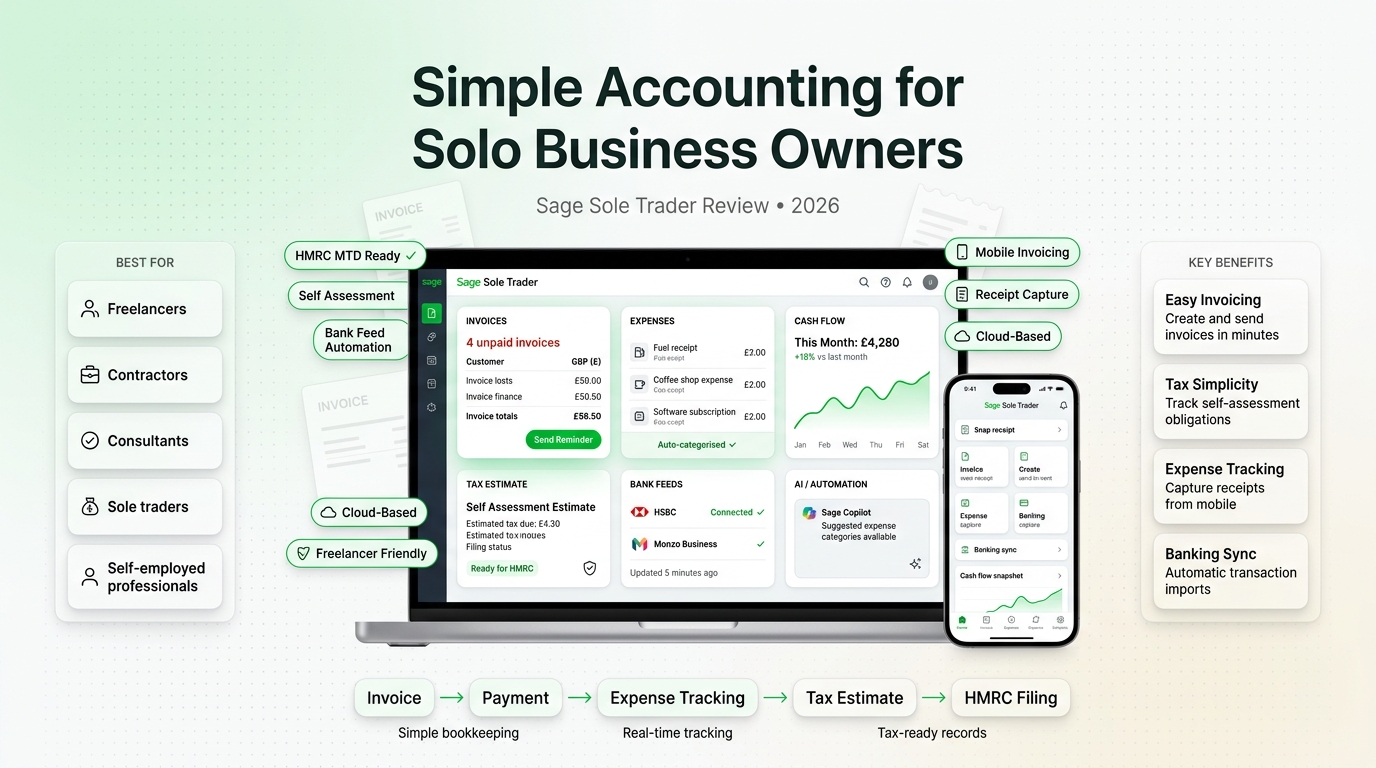
Sage Sole Trader is built for self-employed people, freelancers, and non-VAT registered sole traders who want a simpler way to manage income, expenses, tax records, and Self Assessment admin.
For many sole traders, accounting is not difficult because the business is complex. It is difficult because records are scattered across bank statements, receipts, notes, invoices, spreadsheets, and emails. When tax time arrives, that small amount of weekly admin can turn into hours of sorting, checking, and guessing.
Sage Sole Trader is designed to reduce that problem. It gives self-employed users a cleaner way to keep digital records, monitor income, track expenses, and prepare useful figures for the SA103 self-employment section of a Self Assessment tax return. For non-VAT registered sole traders, it is one of the strongest options to consider in 2026.
Best for
Non-VAT registered sole traders, freelancers, self-employed professionals, and small service-based businesses that want simple digital record keeping.
Main strength
Simple income and expense tracking, Self Assessment support, bank feed/receipt workflows, and a trusted Sage accounting brand behind it.
Main limitation
It is not designed for VAT-registered sole traders or limited companies. Those businesses should usually look at Sage Accounting instead.
Overall view
A very strong choice for sole traders who want to move away from manual record keeping and prepare for digital tax workflows with less stress.
What is Sage Sole Trader?
Sage Sole Trader is accounting and record-keeping software for self-employed people in the UK. It is aimed at sole traders who want to simplify manual bookkeeping, track income and expenses, and keep better records for tax.
The product is especially relevant for sole traders who are not VAT registered. Sage states that the software is built for non-VAT registered sole traders and self-employed professionals filling out the SA103 supplementary page for self-employment income on a Self Assessment tax return. :contentReference[oaicite:1]{index=1}
It is not meant to be a full small business accounting system for every situation. Instead, it focuses on what many self-employed people need most: easier records, clearer tax figures, less manual admin, and a more organised way to handle business finances.

Who Sage Sole Trader is best suited to
Sage Sole Trader is best for self-employed people who want accounting software that feels simple, practical, and focused on their actual needs.
User type | Why Sage Sole Trader may fit | What to check first |
|---|---|---|
Freelancers | Useful for tracking income, business expenses, receipts, and tax-ready totals. | Check whether the free plan is enough or whether the paid plan is better for support and extra features. |
Self-employed professionals | Good for keeping records organised without using complicated accounting software. | Check whether you are VAT registered. If yes, Sage Accounting may be more suitable. |
Side-hustle business owners | Helpful for separating self-employed income and expenses from personal finances. | Check whether bank feeds and receipt capture fit the way you work. |
Non-VAT registered sole traders | Strong fit because the product is specifically positioned around this audience. | Check whether you may need VAT, payroll, or fuller accounting features later. |
Sage Sole Trader pricing
Sage currently presents Sage Sole Trader with a free option and a paid Sole Trader option. The official Sage Sole Trader page states that Sage Sole Trader is free for freelancers and self-employed individuals who are not yet VAT registered, with an option to pay for added features, AI capabilities, and expert customer service. :contentReference[oaicite:2]{index=2}
Sage also states that the paid Sole Trader plan is available with 3 months free, then £7 per month excluding VAT, subject to terms and conditions. :contentReference[oaicite:3]{index=3}
Plan | Current listed price | Best suited to | Typical use case |
|---|---|---|---|
Sage Sole Trader Free | Free | Non-VAT registered sole traders and self-employed users who want basic digital record keeping. | Tracking income, expenses, digital records, and preparing self-employed tax figures without paying for a full accounting plan. |
Sage Sole Trader | 3 months free, then £7 per month excluding VAT | Sole traders who want added features, AI capabilities, and expert customer service. | More complete support for self-employed finance admin, cash flow, records, and Self Assessment preparation. |
Sage Accounting Start | 3 months free, then £18 per month excluding VAT | VAT-registered sole traders or small businesses just getting started. | Fuller accounting needs including VAT management, payroll features, and Sage Copilot. |
Pricing and promotions can change. Always check the latest Sage pricing directly before publishing a live comparison or making a purchase decision.
Key features
Income tracking
Sage Sole Trader helps self-employed users monitor business income. This is useful for freelancers and sole traders who may receive money from different clients, platforms, or projects during the year.
Keeping income organised throughout the year makes Self Assessment preparation less stressful because the business owner is not trying to reconstruct months of activity at the last minute.
Expense tracking
Expense tracking is one of the main reasons to use sole trader accounting software. Without a system, expenses can easily become scattered across receipts, bank statements, email invoices, and payment apps.
Sage Sole Trader is designed to help users track expenses and keep records in a more organised way, which can make tax preparation easier and reduce the risk of missing allowable business costs.
Bank feed and receipt workflows
Sage states that users can record transactions by connecting a bank feed or snapping a photo of receipts. This is helpful for sole traders who want to reduce manual typing and keep supporting records connected to their financial activity. :contentReference[oaicite:4]{index=4}
For many self-employed people, this is one of the biggest benefits. It turns bookkeeping into a regular small task instead of a large tax-season problem.
SA103 Self Assessment support
Sage says the software uses the information shared by the user to calculate self-employed income, calculate expenses, and create copy-and-paste totals to complete the Income Tax Self Assessment return. :contentReference[oaicite:5]{index=5}
This does not replace professional tax advice, but it can make the process clearer for sole traders who need to complete the self-employment section of their tax return.
Cash flow visibility
Sage positions the paid Sole Trader plan for non-VAT registered sole traders wanting to manage Self Assessment and cash flow. For self-employed people, cash flow can be more important than profit on paper because income may arrive irregularly.
Better visibility can help users understand how much money is coming in, what costs are being paid, and whether they should set aside funds for tax.
Cloud access
Sage Sole Trader is cloud-based, which means records are stored online rather than only on one device. Sage also highlights that user information is stored safely and securely in the cloud. :contentReference[oaicite:6]{index=6}
This is useful for self-employed people who want to manage records from different locations and avoid relying only on local files or spreadsheets.
Where Sage Sole Trader works well
Sage Sole Trader works best when the user has simple self-employed finances but wants better organisation. It is not trying to be a complicated finance platform. It is trying to make sole trader record keeping easier.
You are self-employed and not VAT registered.
You want to keep income and expenses organised during the year.
You want less manual spreadsheet work.
You want a clearer way to prepare figures for Self Assessment.
You want software from a trusted UK accounting software provider.
You want the option to start free and upgrade if needed.
Where Sage Sole Trader may not be enough
Sage Sole Trader is not designed for every business. If a sole trader is VAT registered, has employees, runs payroll, manages more complex accounting, or needs fuller business reporting, Sage Accounting may be the better fit.
Sage itself notes that Sage Sole Trader is built for non-VAT registered sole traders and self-employed professionals, and that VAT-registered sole traders or director-only limited companies should consider Sage Accounting plans instead. :contentReference[oaicite:7]{index=7}
It is not the right fit for VAT-registered sole traders.
It is not designed for limited companies with fuller accounting needs.
It may not be enough if you need payroll or advanced reporting.
It may not be enough if you manage stock, multiple users, or multi-currency transactions.
Sage states that you cannot upgrade from Sage Sole Trader to Accounting Start directly; you would need to buy a new Accounting Start licence and cancel Sole Trader. :contentReference[oaicite:8]{index=8}
Sage Sole Trader Free vs paid Sage Sole Trader
The free plan is one of the most attractive parts of Sage Sole Trader because it gives non-VAT registered sole traders a way to start digital record keeping without immediately committing to a paid accounting product.
The paid plan is more suitable for sole traders who want added features, AI capabilities, and expert customer service. For users who want extra confidence and support, the £7 per month paid option can be a sensible upgrade.
Need | Free plan may be enough if... | Paid plan may be better if... |
|---|---|---|
Basic records | You mainly want to start tracking income and expenses digitally. | You want a more complete sole trader workflow and extra help. |
Self Assessment | You are comfortable using basic figures to support your tax return. | You want stronger support for managing Self Assessment and cash flow. |
Support | You are confident managing the software yourself. | You value expert customer service and extra guidance. |
AI capabilities | You only need simple digital record keeping. | You want added AI-supported features as part of the paid plan. |
Sage Sole Trader vs Sage Accounting Start
Sage Sole Trader and Sage Accounting Start are not the same product. The difference matters because choosing the wrong one could mean paying for features you do not need or missing features your business actually requires.
Area | Sage Sole Trader | Sage Accounting Start |
|---|---|---|
Best for | Non-VAT registered sole traders and self-employed professionals. | VAT-registered sole traders and small businesses just getting started. |
Pricing | Free option, or paid plan at 3 months free then £7/month excluding VAT. | 3 months free, then £18/month excluding VAT. |
Tax focus | SA103 Self Assessment support for self-employed income and expenses. | Broader accounting support, including VAT management. |
VAT | Not designed for VAT-registered users. | Designed for businesses that need VAT support. |
Business stage | Early-stage, simple self-employed record keeping. | Small business accounting with more complete finance needs. |
Pros and cons
Pros
Strong fit for non-VAT registered sole traders and self-employed professionals.
Free plan available for basic digital record keeping.
Paid plan is affordable compared with many full accounting products.
Helps track income and expenses throughout the year.
Supports SA103 Self Assessment preparation with useful totals.
Bank feed and receipt workflows can reduce manual admin.
Backed by Sage’s long accounting software experience.
Cons
Not suitable for VAT-registered sole traders.
Not designed for limited companies with fuller accounting needs.
May be too limited for businesses needing payroll, stock, or advanced reports.
You cannot directly upgrade from Sage Sole Trader to Accounting Start; Sage says you need to buy a new licence and cancel Sole Trader.
The free plan may not be enough for users who want support, AI capabilities, or more complete cash flow features.
Who should choose Sage Sole Trader?
Sage Sole Trader is the strongest fit for people who are self-employed, not VAT registered, and want a simple way to get their financial records under control.
Freelancers who want to stop using spreadsheets for everything.
Self-employed people who want clearer income and expense records.
Side-hustle owners who need to separate business activity from personal finances.
Non-VAT registered sole traders preparing for digital tax requirements.
Users who want a free starting point with the option to upgrade later.
Who should avoid Sage Sole Trader?
Sage Sole Trader is not the best option for every user. Some businesses should skip it and look directly at Sage Accounting instead.
VAT-registered sole traders.
Limited companies.
Businesses that need payroll features.
Businesses that need stock tracking or multi-currency support.
Users who want a full accounting platform from day one.
Practical recommendation: If you are a non-VAT registered sole trader, Sage Sole Trader is one of the best starting points. If you are VAT registered or expect to need fuller accounting features soon, Sage Accounting Start is likely the better long-term choice.
Final verdict
Sage Sole Trader is a strong choice for self-employed people and non-VAT registered sole traders who want to simplify record keeping, track income and expenses, and prepare more confidently for Self Assessment.
Its biggest advantage is that it focuses on the real problems sole traders face: scattered receipts, manual records, tax-time stress, and limited visibility over income and expenses. The free plan makes it easy to start, while the paid Sole Trader plan adds more capability at a relatively low monthly cost.
It is not the right product for VAT-registered sole traders, limited companies, or businesses needing advanced accounting features. But for its intended audience, Sage Sole Trader is one of the most sensible accounting software choices in 2026.
Frequently asked questions
Is Sage Sole Trader free?
Sage presents Sage Sole Trader Free as a free option for freelancers and self-employed individuals who are not yet VAT registered. There is also a paid Sole Trader plan with added features.
How much does Sage Sole Trader cost?
Sage states that the paid Sole Trader plan is available with 3 months free, then £7 per month excluding VAT, subject to terms and conditions.
Is Sage Sole Trader good for freelancers?
Yes. Sage Sole Trader is a strong fit for freelancers who are not VAT registered and want a simple way to track income, expenses, receipts, and Self Assessment figures.
Can VAT-registered sole traders use Sage Sole Trader?
Sage says Sage Sole Trader is built for non-VAT registered sole traders. VAT-registered sole traders should usually consider Sage Accounting plans instead.
Can I upgrade from Sage Sole Trader to Sage Accounting Start?
Sage states that you cannot upgrade directly from Sage Sole Trader to Accounting Start. You would need to buy a new Accounting Start licence and cancel your Sage Sole Trader subscription.
Is Sage Sole Trader better than spreadsheets?
For most self-employed people, yes. Spreadsheets can work at the beginning, but Sage Sole Trader gives a more organised way to track income, expenses, receipts, and tax-ready figures throughout the year.