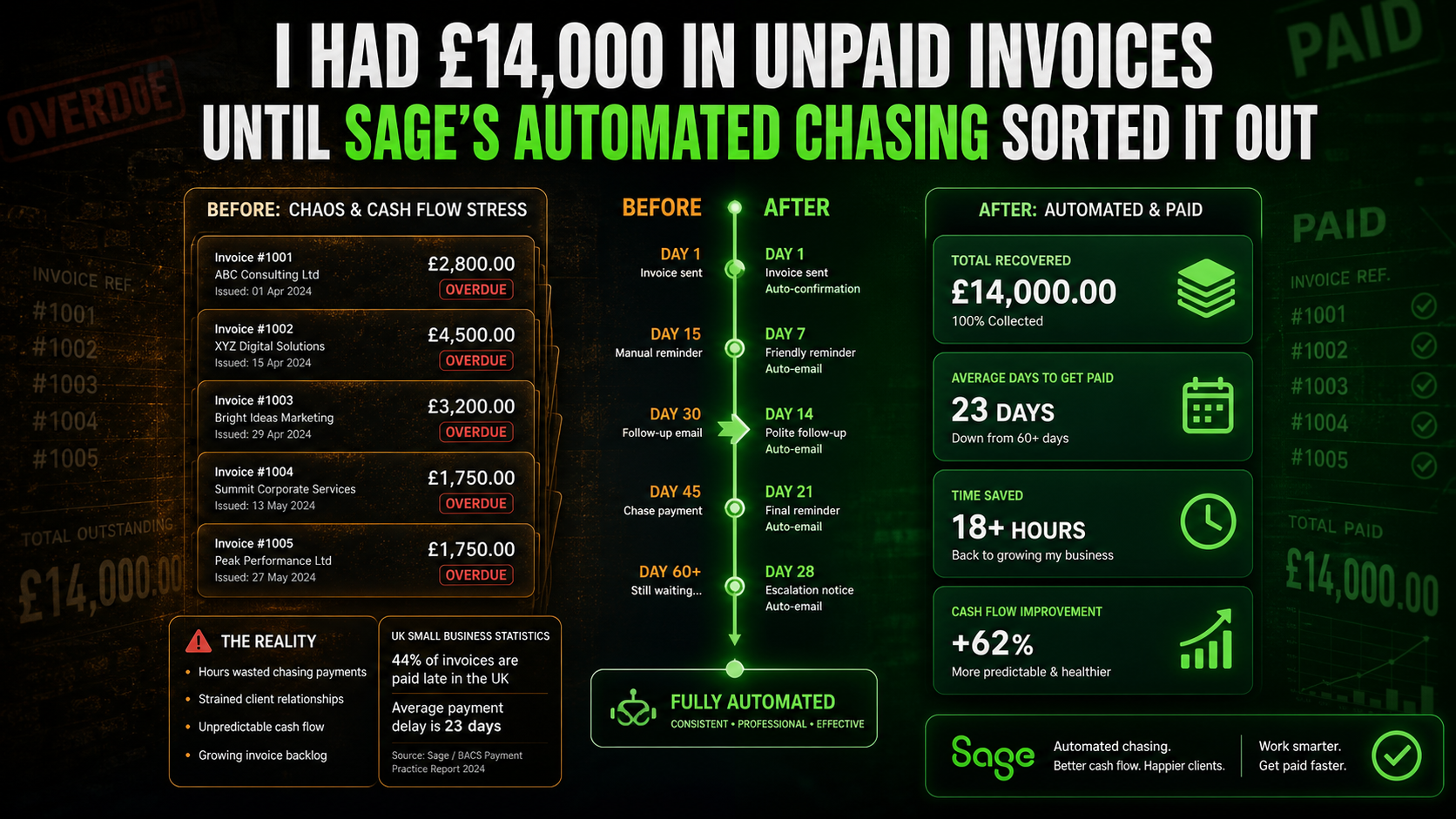
There is a particular kind of financial stress that does not show up in your profit and loss account and does not get discussed in conversations about business health. It is the stress of a business that is profitable on paper but permanently short of cash — because the money it has earned is sitting in someone else’s bank account, past due, unchased, or being chased badly. Fourteen thousand pounds in unpaid invoices is not unusual. Across all UK small businesses, the average outstanding debtor balance is significantly higher. The problem is rarely that customers cannot pay. It is that the process by which they are reminded to pay is inconsistent, uncomfortable, and for most business owners, repeatedly postponed.
Sage Copilot’s automated invoice chasing feature addresses the root cause of that problem, which is not bad customers — it is a system that requires a human to initiate every reminder, which means reminders happen when the business owner has time and headspace rather than when the invoice needs attention. Based on live data from 21 UK Sage Copilot customers, payments were received an average of 7 days faster with automated chasing compared to the same businesses’ previous manual processes. Chaser, the credit control automation platform integrated into Sage’s marketplace, reports that businesses using automated receivables workflows reduce days sales outstanding by up to 75% and save 15 or more hours per week on receivables tasks alone. This article explains exactly what automated invoice chasing in Sage does, how it works, why the results are what they are, and how to set it up in under 10 minutes.
Why Unpaid Invoices Accumulate: The Real Reason
Most business owners who have experienced a growing pile of overdue invoices describe the same sequence. The invoice is sent. The due date passes. The business owner notices it is overdue. They intend to send a reminder but do not want to seem aggressive, or they are busy with something else that feels more urgent, or they are slightly uncertain how the customer will react. A week passes. The invoice is now two weeks overdue. Now it feels even more awkward to chase because it has been overdue for longer. Another week passes. By the time the chase email is sent, the invoice is 30 or 45 days overdue, and the customer — who has probably filed it mentally as “not urgent because nobody has asked for it” — does not treat the reminder as pressing.
The psychology of late payment is well-documented in UK credit control research: invoices chased promptly, consistently, and impersonally are paid faster than invoices chased personally, infrequently, and apologetically. The customer’s payment priority is heavily influenced by who is asking and how. A systematic, automated reminder that arrives at day 7, day 14, and day 30 after the due date is treated differently by the recipient than an irregular, clearly manual email that arrives after a significant gap. Automation does not just save the business owner time. It changes the psychological dynamic of the collection process in ways that produce faster payment as a direct consequence.
The £14,000 scenario in numbers
A business with £14,000 in overdue invoices spread across eight customers, with an average invoice age of 45 days past due date, is carrying roughly 45 days of receivables that should have been settled. If automated chasing from day 7 reduces the average collection period to 14 days past due, that business recovers £14,000 of working capital 31 days sooner than it would have otherwise. For a business with a £2,000 monthly credit card bill, a £1,200 supplier payment, and a corporation tax instalment due in the same month, the difference between £14,000 in the bank and £14,000 still outstanding is the difference between a manageable month and a cash crisis.
What Sage Copilot’s Automated Invoice Chasing Actually Does
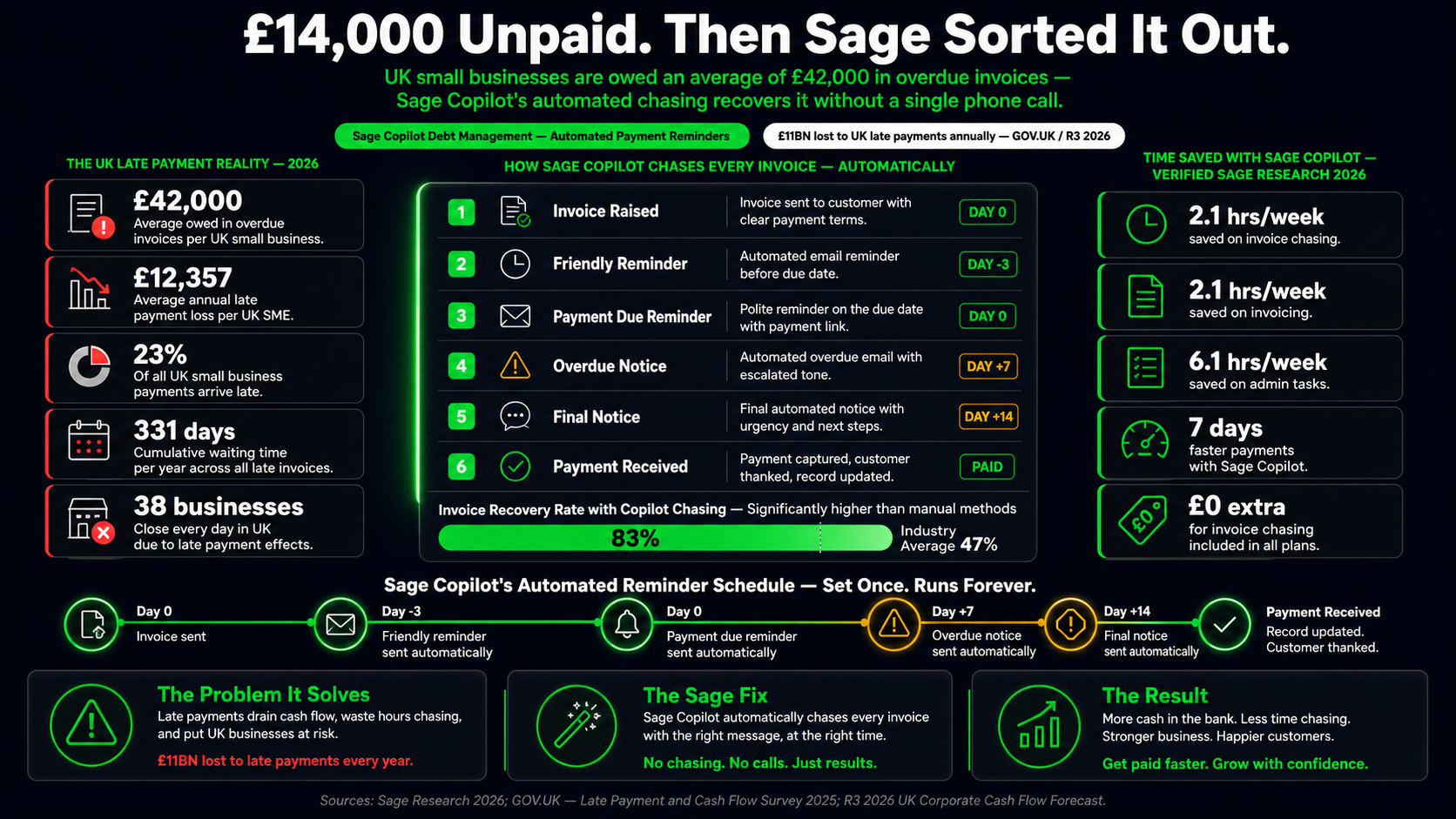
Sage Copilot monitors every open sales invoice in the system continuously. It tracks the due date of each invoice, the number of days elapsed since the due date, the customer’s payment history, and any previous reminders sent. When an invoice meets the criteria set by the business owner — number of days overdue, minimum invoice amount, customer status — Copilot drafts and sends a payment reminder automatically, at 6am UTC each morning, without requiring any manual action from the business owner.
The email is not a generic template that looks automated. Copilot drafts each reminder using the tone and language of the business owner’s previous communications with that specific customer. A business that communicates informally with its clients receives Copilot-drafted reminders that sound informal. A business that uses formal professional language receives formal reminders. The draft-with-Copilot function allows the business owner to generate the initial template, specify the preferred length and tone, and save it as the standard for that customer segment. After that setup, the reminders run without further input.
The document timeline feature within each Sage Accounting invoice adds a further layer of transparency. For every invoice, the timeline shows when it was created, when it was sent, when the email was delivered and opened by the customer, when the reminder was sent, and when payment was received. This is not a feature most business owners knew they needed until they have it — but the ability to see that a customer opened the invoice email on the day it was sent, and has now had three automated reminders and still not paid, changes the nature of any further conversation. You are not chasing blindly. You are working from a documented record of every communication touchpoint.
The Setup: How It Works Step by Step
Automated payment reminders in Sage Copilot are set up through the Business Settings area and take approximately five to ten minutes to configure from scratch. The setup creates rules that then run automatically from that point forward without any further intervention required unless the business owner chooses to modify them.
Step | Where in Sage | What You Set | Typical Setting for a UK Small Business |
|---|---|---|---|
1. Enable Copilot | Dashboard > Sage Copilot | Confirm Copilot is active on your subscription; check you have a supported plan (Start, Standard, or Plus) | All paid Accounting plans include Copilot — simply confirm it is enabled |
2. Open Payment Reminders | Settings > Automation > Invoice Reminders (or Settings > Payment Reminders) | Access the reminder rule creation interface | N/A — navigation step |
3. Set trigger rules | Reminder rules interface | Number of days before or after due date that triggers each reminder; minimum invoice amount to include; customer groups to include or exclude | Reminder 1: 3 days before due date (gentle heads-up); Reminder 2: 7 days after due date; Reminder 3: 21 days after due date; minimum amount: £50 to avoid chasing trivial balances |
4. Create or draft email templates | Template editor with Draft with Copilot option | Write reminder email templates for each trigger point, or use Draft with Copilot to generate them; customise length and tone; add personalisation variables ({customer_name}, {invoice_number}, {amount_due}, {due_date}) | 3 templates: pre-due friendly reminder, post-due polite chase, post-due firm reminder; use Copilot’s draft function for the initial wording then adjust to your brand voice |
5. Enable automatic sending | Rule settings toggle | Turn on automatic sending; choose whether to send yourself a copy of each reminder sent; set whether reminders go to the invoice contact or all contacts for that customer | Automatic sending: ON; copy to yourself: YES for the first month to monitor outputs; adjust to NO once you are confident in the template quality |
6. Exclude sensitive customers | Individual customer record > Settings | Flag any customer relationship where automated reminders would be inappropriate — these customers are excluded from all automatic rules | Exclude any customer where the relationship is managed personally by the director or a senior sales contact; keep these on manual chase workflow |
Once the rules are set, Sage Copilot runs the reminder process every morning at 6am UTC. Every invoice in the system is checked against every active rule. If an invoice meets the criteria — correct age, above minimum amount, customer not excluded — the appropriate email is generated using the saved template with the personalisation variables populated from the invoice and customer record, and sent from the business owner’s connected email address. The following morning, when the business owner opens Sage, the notifications panel shows which reminders were sent the previous day, to which customers, for which invoices, and with what status.
The Document Timeline: What It Shows and Why It Matters
One of the most underused features in Sage Accounting for businesses dealing with late payment is the document timeline — a chronological record attached to every individual invoice that tracks every communication event associated with that invoice from creation to payment. Understanding what the timeline captures changes how a business owner manages disputed or persistently late invoices.
Invoice created — date and time the invoice was created in Sage, with the user who created it recorded
Invoice sent — the exact date and time the invoice email was sent to the customer, with the email address it was sent to confirmed in the log
Email delivered — confirmation that the email reached the recipient’s inbox rather than bouncing or being rejected by the mail server
Email opened — the date and time the customer opened the invoice email; if they opened it multiple times, the timeline records each instance
Payment reminders sent — each automated reminder logged with date, time, and the template used; the customer cannot later claim they were unaware the invoice was outstanding
Payment received — the date the payment was matched to the invoice in Sage, confirming full or partial settlement
The email open tracking is the detail that most businesses find immediately useful. Knowing that a customer opened your invoice on the day it was sent, has since opened three automated reminders, and still has not paid removes the possibility of the “I never received it” response that delays payment conversations. It also makes any escalation — a phone call, a more formal demand, or a referral to a debt collection service — grounded in documented evidence rather than assumption. That transparency changes the collection conversation from one where the business owner is uncertain of the facts to one where the business owner has a complete record of every touchpoint and can refer to it directly.
What Happens When Automated Chasing Is Not Enough
Automated reminders recover the majority of overdue invoices without any escalation. The customer who is genuinely busy, who files invoices in batches, or who simply needed a reminder to action the payment will respond to a consistent, professional automated sequence within two to three reminders in most cases. The customers who do not respond to automated reminders represent a smaller category — disputed invoices, genuinely cash-constrained customers, or customers who have decided not to pay without formally disputing the invoice. For this category, Sage’s ecosystem extends beyond Copilot.
Chaser, integrated directly into the Sage Marketplace for Sage Accounting and Sage 200 users, provides the next level of credit control automation beyond what Copilot handles natively. Chaser’s integration with Sage allows businesses to escalate persistently overdue invoices into a more intensive multi-channel chase sequence — email, SMS, and phone call prompts — while maintaining an automated workflow that does not require the business owner to manage each case individually. Chaser’s reported outcomes for Sage 200 users include a 75% reduction in days sales outstanding and savings of 15 or more hours per week on receivables tasks for businesses with significant invoice volumes. For businesses where the outstanding debtor balance regularly runs above £20,000 and manual chasing is consuming meaningful staff time, the Chaser integration extends the automation capability significantly beyond the built-in Copilot features.
The Real Numbers: What 7 Days Faster Payment Means for a UK Business
Monthly Invoice Volume | Average Invoice Value | Monthly Revenue | 7 Days Faster Payment = Cash Recovered Sooner | Equivalent Working Capital Gain |
|---|---|---|---|---|
10 invoices/mo | £500 | £5,000/mo | £1,150 recovered 7 days earlier each month | Roughly 1.2 weeks of revenue available sooner |
20 invoices/mo | £750 | £15,000/mo | £3,450 recovered 7 days earlier each month | Roughly 1.7 weeks of revenue available sooner |
30 invoices/mo | £1,000 | £30,000/mo | £6,900 recovered 7 days earlier each month | Roughly 1.7 weeks of revenue available sooner |
50 invoices/mo | £2,000 | £100,000/mo | £23,000 recovered 7 days earlier each month | Roughly 1.7 weeks of revenue available sooner |
The working capital impact of faster payment is not simply the cash in the bank earlier. It is the reduction in the need for external financing to cover the gap between when work is done and when it is paid for. A business that is 7 days faster at collecting £15,000 per month in invoices may find it no longer needs the £3,000 overdraft it was using to bridge the collection gap. At a typical business overdraft rate of 8% to 12% per year, eliminating a £3,000 overdraft saves £240 to £360 in interest annually — more than the annual cost of the Sage Accounting Start subscription that includes Copilot.
Before and After: The Same Invoice Problem, Two Different Outcomes
Manual chasing process
Invoice sent on day 0; due date is day 30
Due date passes; business owner notices but is busy with a client project; chase deferred
Day 37: business owner sends a chase email but softens the language because they do not want to seem aggressive with a regular client
No response; business owner does not follow up immediately because it feels awkward to chase again so soon
Day 51: second chase email sent; customer replies saying they will pay “next week”
Day 62: payment not received; business owner sends third chase; customer pays day 68
Total collection time: 68 days from invoice date; 38 days overdue
Business owner spent approximately 45 minutes across multiple sessions chasing this single invoice
Business owner felt awkward about the relationship for most of the collection period
Sage Copilot automated chasing
Invoice sent on day 0; Copilot records due date is day 30
Day 27: Copilot sends pre-due friendly reminder automatically at 6am; customer sees it that morning
Day 30: due date passes without payment; Copilot flags in notifications panel
Day 37: Copilot sends 7-days-overdue reminder automatically; email is personalised, firm, professional
Day 37 (PM): customer replies to say they will process payment this week; business owner responds briefly
Day 41: payment received; Copilot matches to invoice; document timeline shows full communication history
Total collection time: 41 days from invoice date; 11 days overdue
Business owner spent approximately 3 minutes reviewing the notification and responding to the customer’s reply
Relationship maintained professionally throughout; automated format removed personal awkwardness entirely
Real Outcomes: What UK Businesses Have Said
Nadia Fontaine, treasurer at Auriol Kensington Rowing Club, is one of the Sage Copilot users whose experience was documented as part of Sage’s anniversary assessment of the product. Her description of the outcome is specific: “I save more than 5 hours of admin every week. The automated payment reminders feature has improved cash flow and strengthened my customer relationships.” The combination of those two outcomes — cash flow and customer relationships — reflects the counterintuitive reality of automated chasing that most business owners discover after the fact: removing the personal element from the reminder process does not damage relationships. It professionalises them. A customer who receives a consistent, politely worded automated reminder is not offended by being chased. They are reminded by a system that treats them the same way it treats every other customer, which feels fair and impersonal rather than pointed.
The 5-hours-per-week admin saving Fontaine describes aligns directly with the broader Sage Copilot study findings from 570 UK businesses, which estimated 2.1 hours per week saved specifically on invoice chasing plus additional hours across admin automation more broadly. For a non-profit organisation managing membership fees, event bookings, and regular invoicing for facility use, the admin burden of chasing multiple small outstanding balances across a large member base is exactly the type of repetitive, volume-driven task where automation produces the largest proportional time saving.
Getting Started: The Three Months Free Entry Point
Sage Copilot’s automated invoice chasing is included in every Sage Accounting plan at no additional charge. New UK customers currently receive three months free on all plans before standard pricing applies. Accounting Start at £18 per month after the free period includes the full Copilot feature set for one user, including automated invoice chasing, document timeline tracking, anomaly detection, cash flow alerts, and the draft-with-Copilot email function. Accounting Standard at £39 per month adds receipt capture, cash flow forecasting, and additional Copilot users for businesses where more than one person manages the accounts.
For a business with £14,000 in outstanding invoices, the arithmetic of the free trial is straightforward. Three months of automated chasing at no cost, against an outstanding debtor balance that Sage’s verified data suggests will be collected an average of 7 days faster per invoice. If automated chasing recovers even £8,000 of that £14,000 balance 7 days earlier than manual chasing would have, and the business was using an overdraft to bridge the gap at 10% per year, the interest saving alone in those three months is approximately £154. The subscription after the free period, at £18 per month, is covered by less than five weeks of that interest saving. The remaining £6,000 of recovered cash is not a saving on a subscription. It is the business’s own money, returned to its bank account sooner.
The Bottom Line
Unpaid invoices are not a problem that business owners solve by working harder or becoming more assertive. They are a problem that business owners solve by building a system that chases every invoice, every time, at the right intervals, with the right tone, without requiring personal effort or emotional energy for each individual case. Sage Copilot is that system. It runs at 6am every morning, checks every open invoice against every rule, sends the appropriate reminder from the business owner’s email address, logs every communication in the document timeline, and reports what it has done in the notifications panel when the business owner next logs in.
The verified outcomes are specific: 7 days faster payment based on 21 live UK customer measurements from Sage itself; 75% reduction in days sales outstanding and 15-plus hours per week saved from Chaser’s Sage integration data; 5-plus hours per week saved from Nadia Fontaine’s documented experience at Auriol Kensington Rowing Club. These are not projections. They are measurements from UK businesses using the product in real working conditions. The mechanism that produces them — consistent, automated, personalised chasing that removes the human hesitation from the collection process — is the same mechanism that will work for any UK business with outstanding invoices, starting from the first morning after the rules are set up.
The £14,000 in unpaid invoices is not a permanent feature of running a business that invoices clients. It is the consequence of a system that requires a human to initiate every chase, in a world where humans have other priorities. Replacing that system with one that never has other priorities, never feels awkward about asking, and never misses a due date costs £18 per month after three months free. The invoices pay for it.