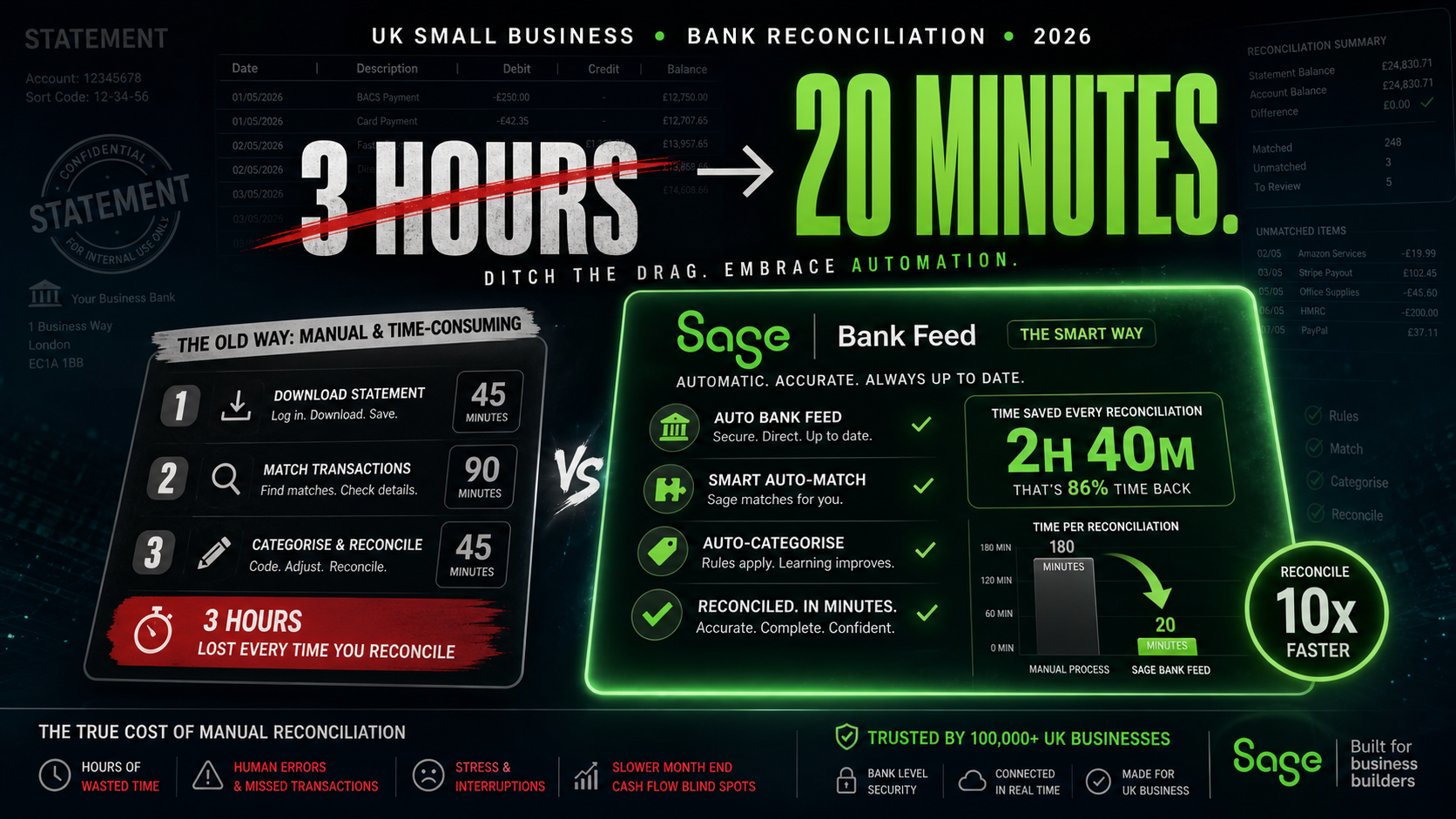
Bank reconciliation is the task that most small business owners describe the same way: necessary, tedious, and quietly consuming far more time than it should. You open the bank statement. You open the accounts. You work through the transactions one by one, matching what went out and came in against what the records say happened. You find the discrepancy that is always there. You track it back through the month’s entries. You fix it. You start again on the next month. Three hours later, you are reconciled for one account across one month, and you still have two other accounts to do.
That is not an unusual experience. UK small business owners collectively spend an estimated 120 hours per year on bank reconciliation — roughly three full working weeks of uninterrupted time given over to a task that produces no revenue, creates no client value, and generates no growth. It is pure administrative overhead, and it is entirely avoidable. This article explains exactly where those hours come from, what Sage’s automated bank feed and transaction matching actually does to them, and why the businesses that have made the switch consistently report the same outcome: what used to take a morning now takes the time it takes to drink a coffee.
Where the Three Hours Actually Go
The three-hour bank reconciliation is not three hours of complex financial analysis. It is three hours of low-value, high-attention matching work that creates the conditions for errors rather than preventing them. Understanding where the time goes is the first step to understanding why automation eliminates it so completely.
The process typically starts with exporting a bank statement — downloading a CSV or PDF from the bank’s online portal, then either importing it into accounting software or working alongside it manually. That step alone, repeated monthly across multiple accounts and credit cards, consumes 15 to 30 minutes before any matching has begun. Then comes the transaction-by-transaction review: finding the corresponding entry in the accounts for each bank transaction, confirming the amounts match, identifying transactions that appear in one place but not the other, investigating the discrepancies, and correcting the records where something was entered incorrectly or not entered at all.
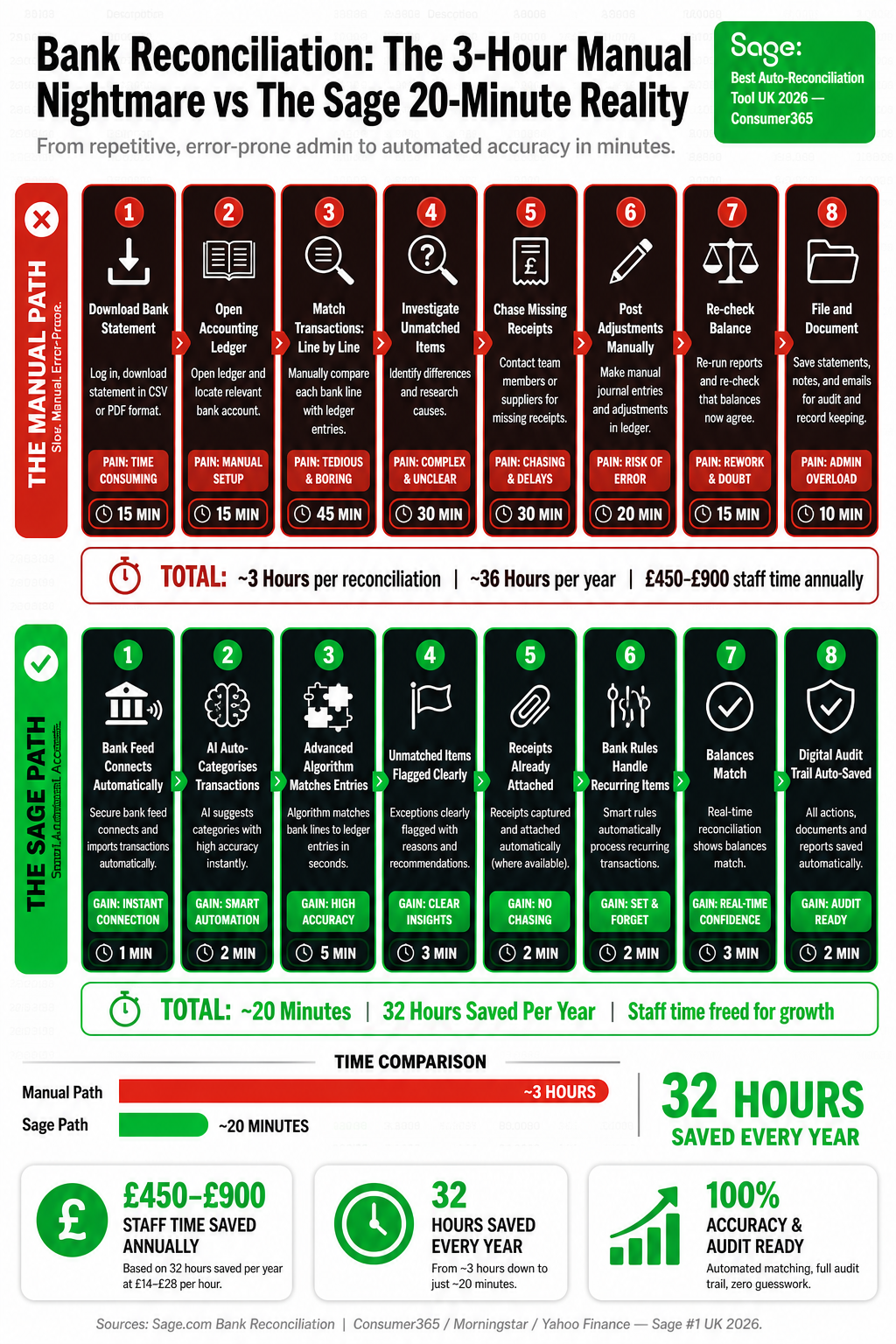
The discrepancies are where the time really goes. A single transposed figure — £1,340 entered as £1,430 — can take 20 minutes to find if the error is buried in a busy month. A supplier payment that was entered under the wrong date, or a customer receipt that was categorised incorrectly, produces a balance that is wrong by an amount that does not immediately point to its own cause. Finding and fixing five of those in a month’s reconciliation is not unusual, and it is where the three-hour total accumulates. The matching itself is fast. The investigation of mismatches is slow — and manual data entry is the primary cause of every mismatch worth investigating.
The Manual Process Step-by-Step
Step | What It Involves | Typical Time | Error Risk |
|---|---|---|---|
Export bank statement | Log into online banking; download CSV or PDF for the period; repeat for each account | 10–20 mins | Low — unless wrong date range selected |
Import or open alongside accounts | Import CSV into accounting software or open PDF beside accounts spreadsheet | 5–15 mins | Medium — import mapping errors common |
Match transactions manually | Work line by line through bank statement; find corresponding entry in accounts | 45–90 mins | High — fatigue increases error rate; easy to mis-match similar amounts |
Investigate discrepancies | Find and explain every difference between bank balance and book balance | 30–60 mins | Very high — source of most time loss; errors may cascade from previous months |
Correct entries | Amend or add transactions in accounts to match bank; re-categorise where needed | 15–30 mins | High — corrections made under time pressure introduce new errors |
Final balance check | Confirm closing bank balance matches closing book balance; document sign-off | 10–15 mins | Low if all previous steps completed correctly |
Total (manual) | — | 2–4 hours per account per month | High cumulative risk across all steps |
Multiply that process by 12 months and two accounts — current account and a business credit card — and the annual time cost reaches 48 to 96 hours before any additional complexity is considered. Add a third account, a PayPal balance, or Stripe payments and the total climbs further. For a business owner billing £50 to £100 per hour for their professional time, the opportunity cost of that annual bank reconciliation — the revenue not earned because those hours were spent on a matching exercise — is between £2,400 and £9,600 per year.
What Bank Feeds Actually Do
Sage’s bank feed feature connects directly to UK bank accounts and credit cards using open banking technology regulated under the FCA’s open banking framework. Transactions are imported automatically, typically within hours of being processed by the bank, without any manual export, download, or import step. The connection is secure, read-only, and does not require the business owner to share banking credentials with Sage — it operates through the bank’s own open banking API.
Once imported, Sage’s transaction matching engine compares each bank transaction against the outstanding entries in the accounts and suggests matches based on amount, date, and supplier or customer name. Transactions that match exactly are highlighted for confirmation with a single click. Transactions that do not match an existing entry are flagged for categorisation. Sage Copilot, the AI layer built into Sage Accounting, learns from previous categorisations and suggests the correct category for recurring transactions automatically — so the standing order for office rent that was categorised as “premises costs” last month is automatically suggested as “premises costs” this month without any manual decision required.
Why the 20-minute figure is real
When transactions are imported automatically and matched by the system, the business owner’s role in reconciliation reduces to three tasks: confirm exact matches (one click per transaction), categorise unmatched items (Copilot suggests the category; owner confirms), and review the closing balance. For a business with 40–60 transactions per month, that entire process takes 15 to 25 minutes — not because the work has been rushed, but because the slow parts have been automated away entirely.
The Error Reduction That Matters as Much as the Time Saving
The time saving from automated bank feeds is the headline, but the error reduction is arguably more valuable. Manual reconciliation introduces errors through transcription — amounts entered incorrectly, dates wrong by a day or a month, suppliers confused with each other, payments split differently in the accounts than they appeared on the bank statement. Each of those errors produces a discrepancy that must be found and corrected, and each correction introduces the possibility of a further error. In a manually reconciled set of accounts, small errors accumulate over months and emerge as significant discrepancies at year-end, by which point the original source is hard to trace.
Automated bank feeds eliminate transcription errors at the data entry stage because there is no transcription. The transaction amount, date, and reference that appear on the bank statement are the same transaction amount, date, and reference that appear in Sage — because they came from the same source. The only human judgement required is categorisation, and even that is increasingly automated by Copilot’s learning engine. The result is a set of accounts where the bank balance and the book balance agree not because someone spent three hours making them agree, but because they have been fed from the same data source throughout the month.
For accountants reviewing client records at year-end, the difference between a Sage client with bank feeds and a manual client is immediately apparent. The Sage client’s accounts reconcile cleanly. The manual client’s accounts require investigation, correction, and often multiple back-and-forth queries before the accountant can proceed. That difference in accountant time translates directly into a difference in the client’s year-end bill — which is a direct financial return on the decision to use automated bank feeds rather than manual reconciliation.
Before and After: The Same Month, Two Different Experiences
Manual reconciliation
Log into bank on the 1st of the month; download last month’s statement as CSV or PDF
Open accounting software alongside the statement; begin matching line by line
Find three transactions that do not match; investigate each one individually
Discover a supplier payment entered with the wrong amount in October; trace back through invoices to confirm correct figure
Correct the entry; re-run the reconciliation; find the balance is still £23 out
Spend 25 minutes finding the £23 discrepancy — a bank charge not entered in the accounts
Enter the bank charge; confirm the reconciliation; document and close
Repeat the entire process for the business credit card
Total time: 2 hours 45 minutes for two accounts
Sage with automated bank feeds
Open Sage; transactions from the entire month already imported automatically from the bank feed
Sage has matched 47 of 52 transactions automatically; 5 require attention
Click to confirm the 47 automatic matches: 2 minutes
Review the 5 unmatched items; Copilot has suggested correct categories for 4 of them based on previous months
Confirm the 4 suggested categories with one click each: 1 minute
Categorise the fifth item — a new supplier — manually: 30 seconds
Sage confirms the bank balance matches the book balance; reconciliation complete
Credit card feed reconciled separately in 4 minutes on the same interface
Total time: 18 minutes for two accounts
The Open Banking Connection: How It Works and Why It Is Secure
Open banking in the UK is regulated by the Financial Conduct Authority and operated through the Open Banking Implementation Entity, established under the Competition and Markets Authority’s 2016 banking investigation. All major UK banks — including Barclays, HSBC, Lloyds, NatWest, Santander, Halifax, and the major challenger banks including Monzo, Starling, and Tide — are required to provide open banking APIs that allow FCA-regulated third-party providers like Sage to access transaction data with the account holder’s explicit consent.
The connection does not share banking credentials. Sage never sees or stores the username or password for your business bank account. The authorisation is granted directly through the bank’s own secure interface, and it is read-only — Sage can see transaction data but cannot initiate payments, move funds, or change account settings. The consent can be revoked at any time through either Sage or the bank. The data transmitted is encrypted in transit and at rest. For businesses concerned about the security implications of connecting accounting software to a bank account, the open banking model specifically addresses those concerns — it is more secure, not less, than manually downloading bank statements and uploading them to third-party software.
What Sage Copilot Adds on Top of the Bank Feed
The bank feed solves the data import problem. Sage Copilot solves the categorisation problem. The two together are what reduces reconciliation from hours to minutes, because the bank feed eliminates manual data entry and Copilot eliminates manual decision-making for the majority of transactions.
Learns from your categorisation history — every time you categorise a transaction, Copilot records the association between that merchant or payment reference and the category you assigned. The next time a transaction from the same source appears, Copilot suggests the same category automatically. After three to four months of use, the suggestion accuracy for recurring transactions is typically above 90%.
Handles rule-based recurring transactions — standing orders, direct debits, and regular subscriptions can be set to categorise automatically without any human confirmation required once the rule is established. The monthly Sage subscription, the office broadband, the HMRC PAYE payment — all categorised and matched without opening a single transaction.
Flags anomalies for review — Copilot identifies transactions that break established patterns: an unusually large payment to a supplier who normally charges a consistent amount, a duplicate transaction that matches one already in the system, a payment reference that does not correspond to any outstanding invoice. These are surfaced for human review rather than silently matched or silently left unmatched.
Suggests split transactions — where a single bank transaction covers multiple categories (a mixed supplier invoice, a business and personal element on a shared card), Copilot suggests the split based on previous similar transactions and allows confirmation with a single click.
Updates VAT treatment automatically — for VAT-registered businesses, the correct VAT rate is applied to each categorised transaction based on the category rules. A transaction categorised as “staff entertainment” has its VAT treatment applied automatically, including the partial reclaim rules for mixed business/personal entertainment, without requiring the business owner to know the rule.
The MTD Connection: Why Good Reconciliation Matters More Now
For businesses within the scope of Making Tax Digital — all VAT-registered businesses, and from April 2026 sole traders and landlords with qualifying income above £50,000 — the quality of the bank reconciliation has compliance implications that it did not have when annual returns were the norm. Under MTD for Income Tax, quarterly updates submitted to HMRC reflect the income and expenditure recorded in the accounts for that quarter. If the accounts are not reconciled and the transactions are not categorised, the quarterly update reflects incomplete or inaccurate data — which means the HMRC record of the business’s financial position is wrong.
A business that reconciles at year-end can correct a year’s worth of errors in one exercise before filing the annual return. A business under MTD that submits quarterly updates from unreconciled accounts is either submitting incorrect data four times per year or delaying the reconciliation until after each quarterly deadline, which creates exactly the same annual backlog problem that MTD was designed to prevent. The quarterly rhythm of MTD only works as intended when the records are reconciled continuously — which is precisely what automated bank feeds and Copilot provide. The compliance benefit and the efficiency benefit are the same feature viewed from two angles.
The Annual Time Saving: What You Do With Those Hours
Reconciliation Approach | Time Per Month (2 accounts) | Annual Total | Annual Cost at £75/hr equivalent |
|---|---|---|---|
Manual (statement download + line-by-line matching) | 2.5–4 hours | 30–48 hours | £2,250–£3,600 |
Semi-automated (CSV import, manual matching) | 1.5–2.5 hours | 18–30 hours | £1,350–£2,250 |
Sage bank feeds + Copilot matching | 15–25 minutes | 3–5 hours | £225–£375 |
Saving: Manual vs Sage | 2–3.5 hours saved per month | 27–45 hours saved | £2,025–£3,225 saved annually |
The hours saved from automated reconciliation have a specific value that depends on what the business owner does with them. A sole trader billing £500 per day who recovers two hours per month from reconciliation automation gains the equivalent of three full billable days per year. A business owner who was previously outsourcing reconciliation to a bookkeeper at £30 to £40 per hour saves £900 to £1,800 per year in bookkeeper fees for reconciliation alone. A director whose time has an internal cost saves that cost and reallocates it toward the work that actually grows the business. In each case, the saving is real and specific — not a productivity estimate, but a direct consequence of time that was being spent on manual matching and is no longer required.
Setting Up Sage Bank Feeds: What Is Involved
The setup process for Sage’s bank feed is straightforward enough that most businesses complete it without assistance. The steps are the same regardless of which UK bank is being connected, and the process typically takes less than 10 minutes per bank account.
Navigate to Banking in Sage Accounting — select the bank account you want to connect and choose “Connect bank” from the options menu
Select your bank from the list — Sage supports all major UK high street banks and most challenger banks via the open banking framework; the full list is shown during setup
Authorise the connection through your bank — you are redirected to your bank’s own secure login page; you log in with your banking credentials directly with the bank, not with Sage; the bank asks you to confirm consent for Sage to read your transaction data
Select the account and the start date — choose which account to connect and how far back to import transactions; Sage will import the selected period’s transactions immediately
Set up matching rules for recurring transactions — spend 10 to 15 minutes identifying the standing orders, direct debits, and regular payments that recur each month and setting rules for automatic categorisation
Begin reconciling — from that point forward, transactions appear in Sage automatically; the monthly reconciliation is reviewing what the system has already matched rather than doing the matching yourself
The Bottom Line
Bank reconciliation takes three hours because manual processes require human attention at every step: downloading statements, importing data, matching transactions, investigating discrepancies, and correcting errors that the manual process itself introduced. Remove the manual steps and the attention requirement shrinks to confirmation and exception handling — tasks that take minutes rather than hours because the system has already done the work.
Sage’s bank feed eliminates the import step by connecting directly to UK bank accounts through the FCA-regulated open banking framework. Sage Copilot eliminates most of the categorisation step by learning from previous decisions and suggesting the correct category for recurring transactions automatically. The combination reduces a monthly reconciliation from two to four hours of low-value matching work to 15 to 25 minutes of reviewing what the system has already decided — and confirming the exceptions it has flagged for human judgement.
The 20-minute bank reconciliation is not a claim about an unusually simple business or an unusually capable user. It is the natural result of removing the manual steps that were never necessary in the first place. The transactions were always in the bank. The categories were largely predictable from previous months. The matching was always a comparison of two datasets that should have been identical. Sage connects those datasets automatically so that the monthly reconciliation is not a construction exercise but a confirmation — which is what it always should have been, and what it now takes 20 minutes to complete.