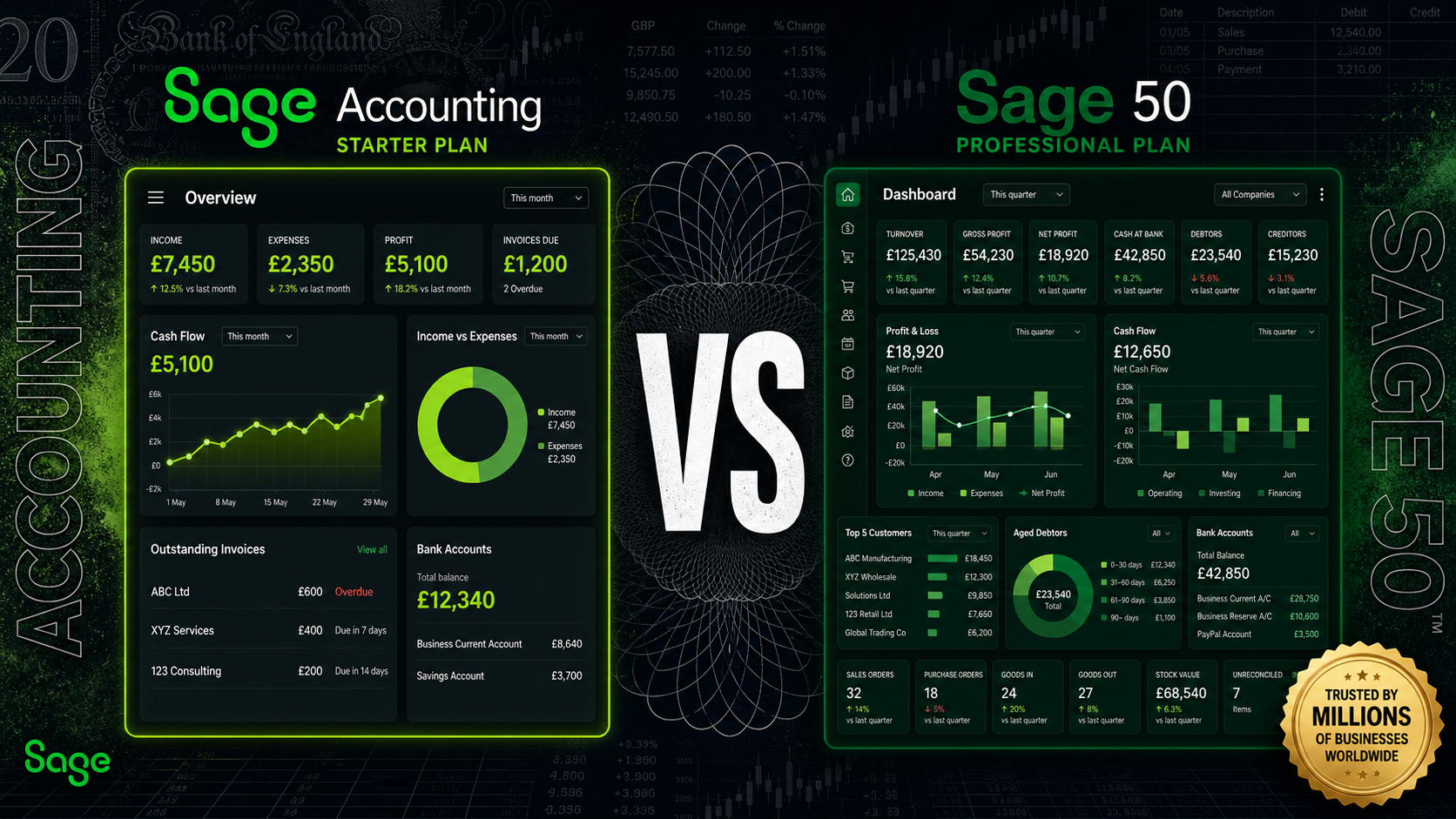
Sage accounting and Sage 50 both carry the Sage name and both handle the fundamentals of business accounting — but for a UK business owner choosing between them, the shared branding is more likely to create confusion than clarity. These are not two versions of the same product at different price points. They are built on different architectures, designed for different types of businesses, and priced according to entirely different assumptions about what accounting software needs to do.
The question for a business owner choosing between them in 2026 is not which platform is technically more powerful. It is which one is actually suited to the size, complexity, and operating model of the business at hand. This guide works through that question directly.
Pricing
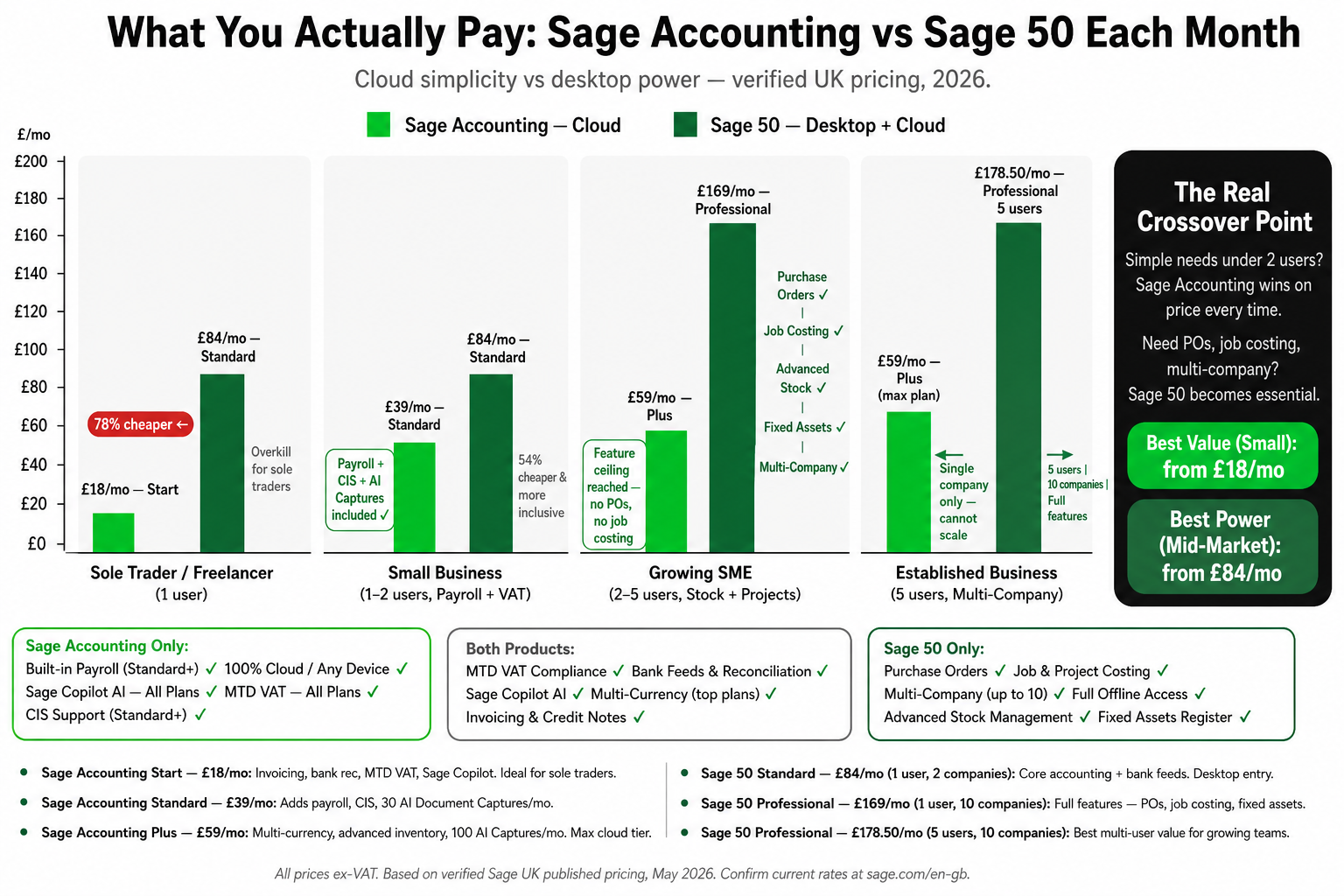
This is where the comparison gets immediately instructive, because the headline numbers reflect the gap in ambition between the two products.
Platform & Plan | Monthly (excl. VAT) | Support Included | Key Features |
|---|---|---|---|
Sage accounting — Free (Sole Trader) | £0 | 24/7 support | Invoicing, expenses, MTD for ITSA, Copilot AI, bank feeds |
Sage accounting — Start | £18 | 24/7 support | Bank feeds, VAT returns, MTD, unlimited invoices, Copilot AI |
Sage accounting — Standard | £39 | 24/7 support | Full payroll, CIS, cash flow forecasting, advanced reporting |
Sage 50 — Essentials | £25 | No support included | Core accounting, VAT, bank feeds, basic reporting |
Sage 50 — Standard | £65 | 3 support sessions | Inventory, purchase orders, project tracking, multi-user access |
Sage 50 — Professional | £132 | Unlimited support | Advanced stock, multi-company, job costing, full reporting suite |
The most striking number in this table is not the price — it is the support column. Sage Business Cloud includes 24/7 support across all plans, including the free tier. Sage 50 Essentials, at £25 per month, includes no support at all. Standard includes three sessions. Only Professional includes unlimited access. For a business where accounting software is running financial records with real operational consequences, the support gap at Sage 50's lower tiers is a risk the pricing tables do not make obvious enough.
The pricing gap at the top end is equally significant. Sage 50 Professional at £132 per month is more than three times the cost of Sage Business Cloud Standard. For a small service business with no inventory and a handful of employees, that difference is difficult to justify. For a growing manufacturer managing warehouse stock across multiple sites, it very likely is.
The number that matters most here is not the monthly fee. It is whether the features at each price point match the actual complexity of the business buying them.
Architecture: Cloud vs Desktop
This is the foundational difference, and it shapes everything else. Sage Business Cloud is a pure cloud product. It runs entirely in a browser, stores data on Sage's servers, and requires no installation. A Mac user, a Windows user, someone working from a tablet on a client site — the experience is identical across all of them. There is no local data to back up, no version to update, and no Windows dependency to manage.
Sage 50 is a desktop application. It installs on a Windows PC and stores data locally. The "cloud" in its older branding refers to connected features — remote access, Microsoft 365 integration, and online backups — not a true cloud architecture. Remote access is possible but adds friction: a business with employees working from different locations, or a director who uses a Mac, will find Sage 50's architecture meaningfully more demanding to set up and maintain.
Sage Business Cloud also handles automatic updates. When Sage releases new features or compliance changes, they appear in the browser. Sage 50 updates must be downloaded and installed, which means version management becomes a task in itself — particularly in businesses where multiple users need to be on the same version simultaneously.
Inventory and Stock Control
This is one of the clearest dividing lines between the two platforms for product-based businesses.
Sage Business Cloud does not offer inventory management. A business that buys, holds, and sells physical stock — a retailer, a wholesaler, a manufacturer, a tradesperson ordering materials against jobs — will hit a hard limit with Sage Business Cloud. There is no mechanism for tracking stock levels, processing purchase orders, or managing goods received. For a pure service business, that absence is irrelevant. For anyone handling physical product, it is disqualifying.
Sage 50 offers advanced stock control at its Standard and Professional tiers: multi-location inventory, batch and serial number tracking, reorder points, stock valuation, and full purchase and sales order processing. For any business with meaningful inventory, Sage 50 is not an optional upgrade. It is the only workable choice between the two.
Reporting
Sage Business Cloud covers the reports that a small service business needs day to day: profit and loss, balance sheet, cash flow statement, and VAT summary. The platform also includes cash flow forecasting from the Standard plan upwards, which is genuinely useful for managing short-term liquidity in a growing business. For a sole trader or micro-business reviewing monthly income and expenses, those reports handle the majority of real compliance and decision-making needs.
Sage 50 goes considerably further. Its reporting suite is customisable, deep, and built for businesses that need to analyse their financials across multiple dimensions — by department, by project, by product line, by supplier, by cost centre. Finance directors and management accountants working at SME level will find Sage 50's reporting environment far more capable, even if most of that depth is invisible and irrelevant to a sole trader reviewing a single-entity P&L. The ability to export directly into Excel with Microsoft 365 integration adds a further layer of analytical flexibility that Sage Business Cloud does not match.
Ease of Use
This comparison goes decisively in one direction. Sage Business Cloud is substantially easier to set up, learn, and use on a daily basis. The interface is designed for business owners who are not accountants, and the learning curve for a new user is shallow. Most sole traders and small business owners can reach a working state — invoicing raised, bank feeds connected, VAT configured — within an hour of creating an account.
Sage 50 carries the complexity that comes with its feature depth. Configuring it properly — chart of accounts, opening balances, stock setup, user permissions, multi-user networking — typically requires either prior Sage experience or the involvement of a trained accountant or Sage partner. The interface has been updated over the years but still reflects the conventions of desktop accounting software designed for trained bookkeepers. For a business owner who wants to run their own books without specialist help, Sage Business Cloud requires far less accounting knowledge to operate correctly from day one.
Sage Copilot — the AI assistance layer included in Sage Business Cloud — further lowers the barrier for non-accountants. It helps categorise transactions, draft invoice follow-ups, flag anomalies, and prepare MTD updates with less manual intervention. That passive assistance is particularly valuable for sole traders and micro-businesses where the accounting is done by the person running the company, not by a dedicated finance function.
Multi-User Access
Single-user and micro-business use cases are handled equivalently by both platforms. The divergence becomes clear as businesses grow and more people need access to financial data simultaneously.
Sage Business Cloud offers multi-user access with permissions, but the structure is simpler and better suited to small teams. Sage 50's multi-user capabilities are more granular — role-based access controls allow administrators to restrict individual users to specific modules, giving a business meaningful control over who can see what across payroll, purchasing, stock, and reporting. For a growing SME with a bookkeeper, a stock controller, and a finance manager all working in the same system, that level of access control has real operational value.
Payroll
Payroll is available in both products, but under different conditions. Sage Business Cloud includes payroll from the Standard plan — covering PAYE, National Insurance, RTI submissions, and digital payslips — without a separate product or additional per-employee charge. For a small business handling its first employees, that is a meaningful inclusion at a reasonable price point.
Sage 50's payroll situation is more complex. Payroll is either bundled or available as an add-on depending on the plan, and Sage 50 Payroll is a more capable product than the payroll included in Sage Business Cloud. It supports a broader range of workplace pension providers, handles more complex pay structures, and scales better as headcount increases. For one or two employees, Sage Business Cloud's payroll is adequate. For a business that is growing its headcount and needs payroll to handle increasing complexity, Sage 50's payroll infrastructure is the more durable system.
Microsoft 365 Integration
For businesses already embedded in the Microsoft ecosystem, this comparison matters more than it might initially appear. Sage 50 offers deep Microsoft 365 integration — direct connections to Outlook for invoice and statement delivery, Excel for reporting and data manipulation, and OneDrive for document storage and backup. For a finance team that lives in Excel and wants accounting data to flow directly into their spreadsheet models, that integration saves meaningful time.
Sage Business Cloud's Microsoft integration is more limited. It connects to the broader accounting workflow but does not offer the same depth of native Microsoft 365 connectivity. For a business that has standardised on Microsoft tools at every level of operations, Sage 50's integration layer is a practical advantage that Sage Business Cloud does not currently match.
Mobile
Sage Business Cloud has a significantly stronger mobile experience. Because it is browser-native and cloud-first, the full product is accessible from any device with an internet connection — including all invoicing, bank reconciliation, expense capture, cash flow, and Copilot AI. The dedicated mobile app extends this further with optimised interfaces for the tasks most commonly performed away from a desk.
Sage 50's mobile presence is limited to the Sage Capture app, which handles receipt capture and some expense submission. The full Sage 50 product does not operate on mobile — it runs on a Windows desktop. For a business owner or finance director who wants to review accounts, approve invoices, or check cash flow from a phone while out of the office, Sage Business Cloud is the only platform between the two that genuinely supports that workflow.
Scalability
This is where the two platforms make opposite promises. Sage Business Cloud is excellent for businesses that are starting small and want to grow gradually within a cloud-first product. The upgrade path from the free Sole Trader plan through Start and Standard is smooth and does not require migration or data export. But Sage Business Cloud does have a ceiling. A business that reaches meaningful operational complexity — significant inventory, high transaction volumes, multi-site stock, complex project billing, or advanced reporting requirements — will eventually find the platform insufficient regardless of which plan they are on.
Sage 50 is designed to carry a business through the full SME stage. Its Professional tier handles multi-company setups, large transaction volumes, complex payroll scenarios, and reporting requirements that would overwhelm any cloud micro-business tool. For a business with genuine growth ambitions into medium-sized territory, Sage 50 is the more durable long-term foundation — even if it costs more, demands more upfront configuration, and requires a Windows environment to run.
Who Each Platform Is Best For
Choose Sage Business Cloud if
You are a freelancer, sole trader, startup, or micro-business with no physical stock
You want cloud access from any device, including Mac or Chromebook
You want a platform you can run yourself without accountant involvement
You need MTD compliance for VAT or Income Tax without complexity overhead
You want 24/7 support included even at the lowest price tier
You want AI assistance (Copilot) built into the product from day one
You run a service business and do not need inventory management
You want a single monthly cost without installation, IT, or version management
Choose Sage 50 if
You manage physical inventory, stock control, or warehouse operations
You need full sales and purchase order processing
You require deep, customisable financial reporting across departments or cost centres
You need granular, role-based multi-user access controls
You are a growing SME that needs job costing and detailed project tracking
You rely heavily on Microsoft 365 and want deep native integration
Your business runs multiple companies and needs to manage them within one system
Your accountant or bookkeeper is already trained and working in Sage 50
The Bottom Line
The naming overlap between Sage Business Cloud and Sage 50 creates more confusion than it resolves. These are not interchangeable options. They reflect fundamentally different decisions about what accounting software is for and who it is designed to serve.
For the large majority of UK freelancers, sole traders, and micro-businesses, Sage Business Cloud is the right starting point. It is more accessible, more affordable, more modern in architecture, and does not ask its users to carry accounting knowledge or IT overhead they do not have. The Copilot AI layer and the 24/7 support included at every price tier make it genuinely capable for one-person and small-team businesses managing their own compliance.
Sage 50 is not a better or worse product — it is a different one. Its strengths are inventory depth, reporting power, multi-user control, and Microsoft integration. Those strengths matter to businesses that have grown beyond the micro stage and need accounting software that can keep pace with real operational complexity. For a sole trader, most of that power is not just unnecessary — it is actively in the way.
If the business is small and service-based, Sage Business Cloud is the more natural choice. If it handles stock, has multiple users with different access needs, runs complex projects, or needs reporting that goes well beyond a monthly P&L, Sage 50 is the more honest fit — and the additional cost reflects real additional capability.